

Introduction:
In the age of Instagram reels, viral TikToks, and Facebook groups, it might be tempting to think that a business website is no longer necessary. After all, a social media page is free, easy to set up, and connects you directly to your audience. But here’s the truth: relying solely on social platforms can limit your growth. In this post, we’ll explore the strategic difference between a Business Website vs Social Media Page and help you understand why having both could be the secret to building a long-term digital brand.
Why This Matters for Long-Term Business Success
Building a business is not about short-term visibility; it’s about long-term sustainability. Social media algorithms change. Platforms evolve. But your website? That’s your permanent digital home. When business owners ask us at Pixcelfy whether they need both a website and a social media page, our answer is clear: YES – and here’s why. Let’s see points one by one for Business Website vs Social Media Page.
Section 1: The Power of a Business Website
1. You Own Your Website
The first point on Business Website vs Social Media Page is : Social media pages are rented space but your business website is owned real estate.
That means:
- You control the design, layout, and branding.
- No sudden algorithm shifts to worry about.
- No risk of being banned or losing access.
2. Better SEO Visibility
The second point on Business Website vs Social Media Page is :
When someone Googles your product or service, what shows up? A properly optimized website with relevant keywords like “Business Website vs Social Media Page” gives you discoverability on search engines — which social platforms can’t.
3. Enhanced Professionalism
The third point on Business Website vs Social Media Page is :
A website with your domain name (like www.pixcelfy.com) sends a strong message:
You’re serious about your business. You’re not just here to post; you’re here to build.
4. Custom Functionality
From e-commerce to bookings to lead capture forms, a website gives you tools that social media simply doesn’t. You can:
- Collect emails
- Track analytics
- Run automated funnels
Section 2: Why Social Media Pages Still Matter
1. Real-Time Engagement
Social platforms are designed for interaction. You can:
- Go live
- Share behind-the-scenes moments
- Run contests and polls
2. Discoverability & Virality
You can reach a new audience faster with:
- Hashtags
- Trends
- Shares from followers
3. Building Community
Whether it’s a Facebook group or an Instagram comment thread, social media builds community around your brand voice.
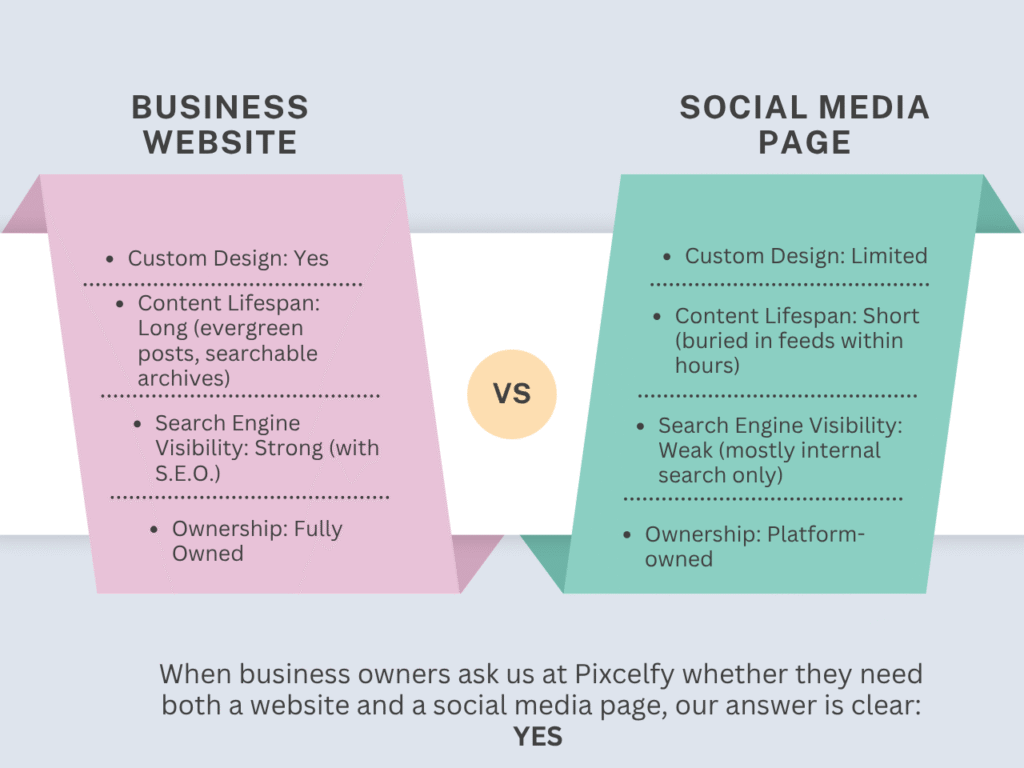
Section 3: Business Website vs. Social Media Page – A Side-by-Side Comparison
| FEATURE | BUSINESS WEBSITE | SOCIAL MEDIA PAGE |
|---|---|---|
| Ownership | Fully Owned | Platform-owned |
| Custom Design | Yes | Limited |
| Search Engine Visibility | Strong (with S.E.O.) | Weak (mostly internal search only) |
| Branding Control | High | Medium |
| Direct Monetization | Easy (e-commerce, booking, etc.) | Hard (requires workarounds) |
| Analytics & Data | Detailed (Google Analytics, Heatmaps, etc.) | Basic insights |
| Content Lifespan | Long (evergreen posts, searchable archives) | Short (buried in feeds within hours) |
Section 4: What Happens When You Rely Only on Social Media?
1. You Lose Credibility
If someone hears about your business and all they find is an Instagram page, they might wonder: Is this legit?
2. You’re at the Mercy of Algorithms
No matter how good your content is, your reach is always controlled by a third party. A sudden algorithm update can tank your traffic overnight.
3. You Can’t Scale Effectively
Want to run affiliate programs, host a membership, or sell directly? A social page can’t do all that. A website opens the door to real business systems.
Section 5: Do You Need Both?
Yes. Here’s the long-term strategy:
- Use your website as your digital headquarters.
- Use your social media pages as outposts to bring people home.
This is the ideal content funnel:
- Social Media Post (hook)
- Leads to Blog Post (like this one!)
- Leads to Freebie/Offer on Website
- Builds Email List or Books Discovery Call
That’s long-term digital strategy.
Section 6: How to Get Started
Step 1: Launch Your Website
Need help? At Pixcelfy, we specialize in affordable, custom websites built with strategy in mind. We recommend starting with:
- A homepage
- About page
- Services or product page
- Blog
- Contact form
Step 2: Connect All Social Media Profiles
Link all your active pages (Instagram, Facebook, LinkedIn, Pinterest, etc.) from your website.
Step 3: Optimize Both for SEO
Use tools like:
- Yoast SEO (WordPress plugin)
- RankMath
- Google Search Console
Step 4: Create a Cross-Promotion Plan
- Share blog content on social
- Link social content in your blog
- Encourage newsletter sign-ups on both
Section 7: Final Verdict On Business Website vs Social Media Page
When thinking about Business Website vs Social Media Page, remember this:
One builds your brand. The other boosts your reach. Together, they create unstoppable momentum.
Want to future-proof your brand? Don’t choose one or the other. Embrace both.
Bonus: Free Website Starter Checklist
Download our free PDF guide: “Website Starter Checklist for Entrepreneurs”
Get step-by-step instructions on launching a powerful website in 7 days or less.
Conclusion
The smartest digital businesses understand the power of “and” instead of “or.”
A Business Website vs Social Media Page isn’t a rivalry — it’s a recipe.
Use both, and your business will not just grow — it will thrive.
For custom website design that actually converts, visit www.pixcelfy.com or follow us on Instagram @pixcelfy.